


An AI writer can give you 2,000 words about almost anything. The harder questions come afterward. Where did that pricing claim come from? Did the writer actually compare the products? Why would Google rank this page above the ten articles it already has? And if ChatGPT recommends a competitor, what are you supposed to do about it?
Those are the questions we built ProofWrite around.
I should make my position clear immediately: I am involved in building ProofWrite. This is a builder's review, with a closer look at the decisions behind the product, its customer-facing features, and its limitations.
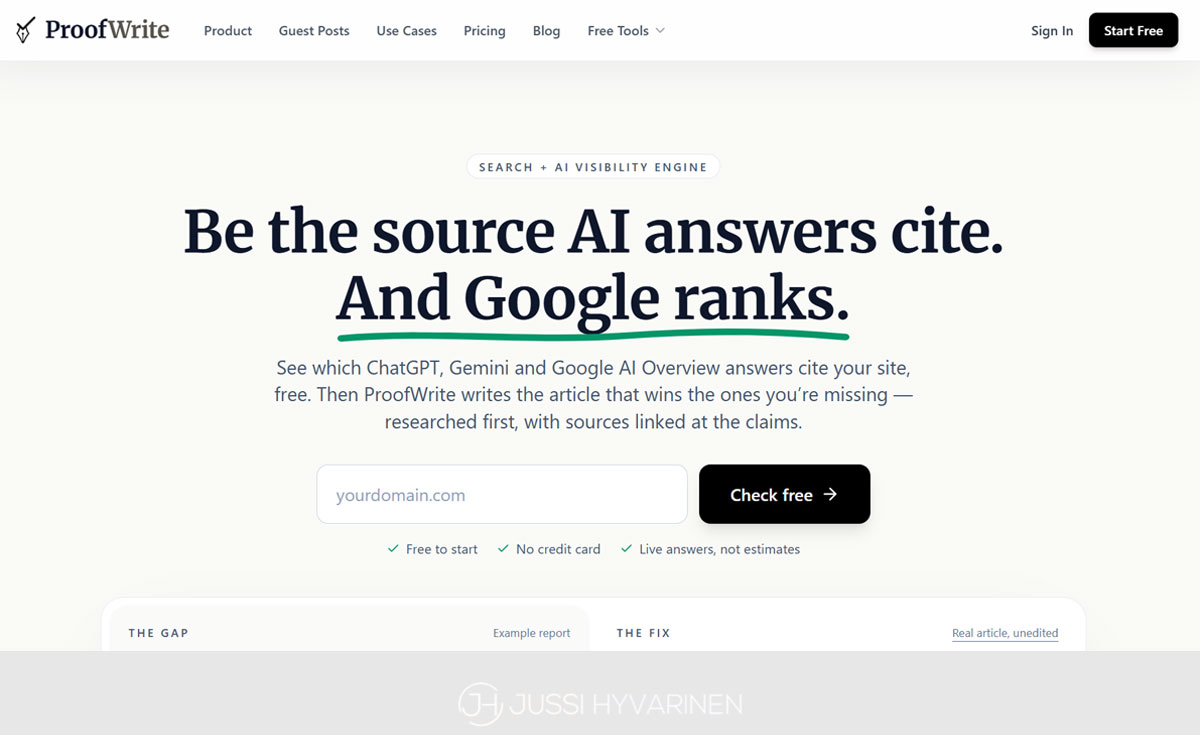
The short answer is that ProofWrite combines article research, AI writing, claim-level fact checking, and AI citation monitoring in one workflow. It helps you identify what to write, collect evidence, produce an article, inspect questionable claims, publish, and monitor whether selected AI answers cite your site.
Its strongest use case is content that has to earn trust: product reviews, comparisons, useful tutorials, affiliate roundups, and articles where getting the details wrong has consequences for your reputation.
What is ProofWrite?
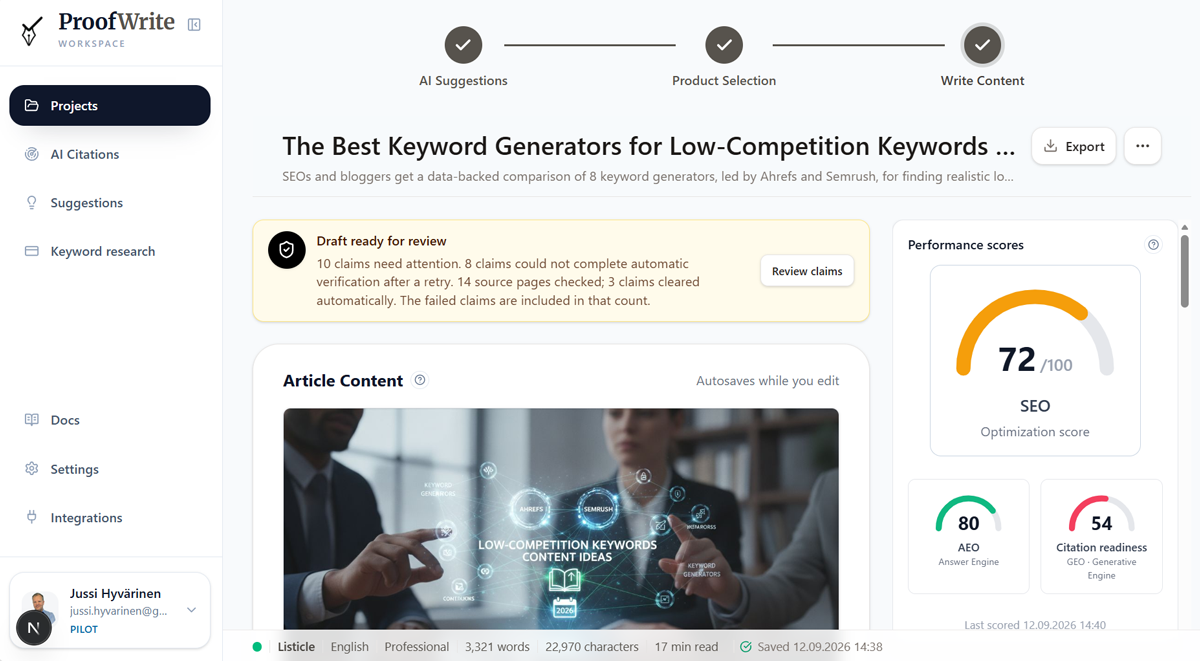
ProofWrite is an AI content platform for bloggers, affiliate publishers, businesses, agencies, and people producing guest posts. It supports six article types: reviews, listicles, how-to guides, comparisons, guest posts, and freeform articles.
You can write for a managed website with saved brand settings, or create a standalone article for an external publication. Alongside the writer are keyword research, daily topic suggestions, an article editor, SEO and answer-readiness scoring, images, internal linking, WordPress publishing, and several public SEO tools.
Here is the practical overview before we get into the details.
Area What ProofWrite does | |
|---|---|
Research | Collects source material through workflows suited to the article type |
Writing | Produces six kinds of articles with your instructions, voice, and experience |
Quality control | Checks drafts and attempts targeted corrections during generation |
Fact checking | Evaluates factual claims and exposes unresolved findings for review |
AI visibility | Monitors selected questions across ChatGPT, Gemini, and Google AI Overviews |
Content improvement | Turns visibility gaps into briefs for new or refreshed articles |
Publishing | Provides an editor, Markdown and HTML exports, and eligible WordPress publishing |
That combination matters more than any individual checkbox. A visibility report is useful. A visibility report that helps you create the missing article is more useful.
Why I expect better articles than a generic AI writer produces
My case for ProofWrite starts with what happens before the first paragraph.
In a basic prompting workflow, the model receives a topic and generates an answer from the information available to it. You can improve that considerably by doing your own research, supplying sources, and checking the result. But then you are the research department, editor, and fact checker.
ProofWrite builds much of that work into the product.
Research follows the job the article has to do
A product review needs different evidence from a tutorial. A comparison needs enough information about both sides to make the comparison fair. A listicle needs a defensible selection of candidates before it starts declaring winners.
ProofWrite uses different research and writing paths for those jobs. Depending on the format, research can include official product pages, pricing information, documentation, relevant search results, third-party reviews, community discussions, and other supporting sources. Product research can examine trust signals rather than simply repeat the company's sales page.
The point is to give the writer usable evidence and context. A current pricing page is a better starting point for a pricing paragraph than the model's recollection of what a subscription used to cost.
There are limits. Some sites block access, some product details are poorly documented, and not every topic has strong independent evidence. ProofWrite cannot turn an inaccessible source into verified knowledge. What it can do is carry the available research into writing and expose issues that still need attention.
Keyword analysis helps establish the right target
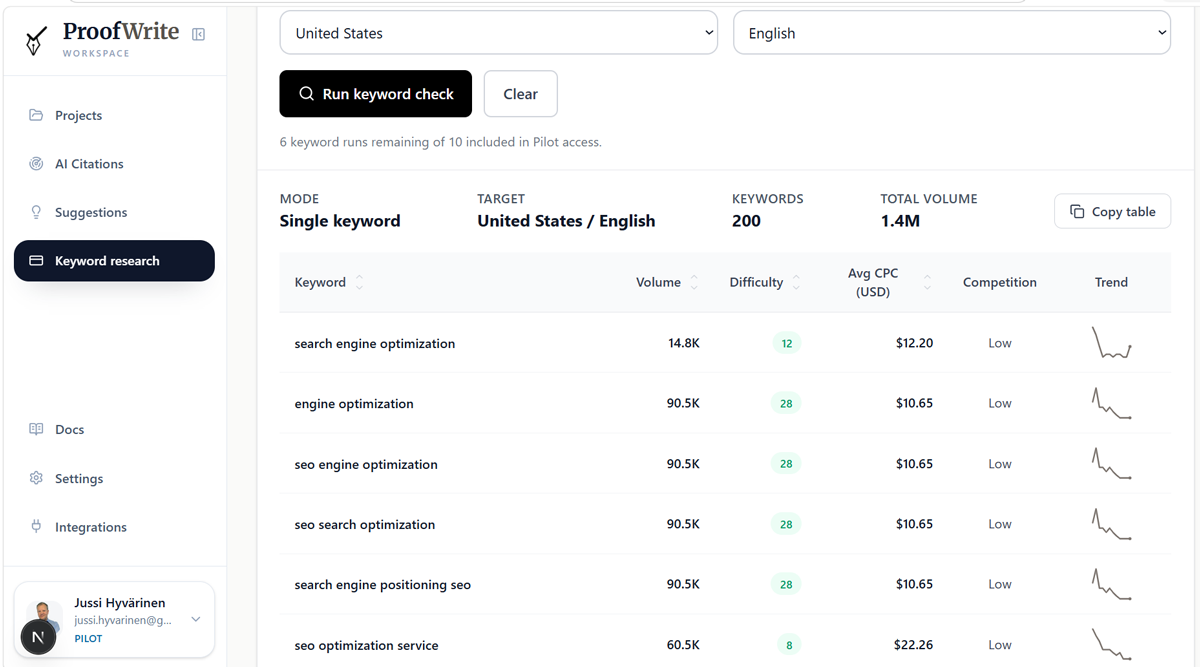
The dedicated Keyword Research tool works before you create an article. Enter a single keyword to explore related ideas, or submit several terms to compare their metrics. You can select country and language, sort the results, inspect search volume, average cost per click, advertising competition, and available trend data, then copy the table for planning.
One detail deserves a plain explanation: the current column labeled “Difficulty” is based on Google Ads competition data. I would use it as an advertising competition signal, not as a backlink-based estimate of how hard it will be to rank organically.
Keyword analysis also forms part of relevant article workflows, including product reviews. It is not forced into every format. A how-to guide follows its own process-focused research path, while a freeform piece may be built entirely from your source material.
That flexibility is useful. An internal case study should not need to masquerade as a product review just to get written.
The draft gets checked and corrected during generation
ProofWrite does more than collect research and hand you the first fluent draft. Its writing workflows include validation and quality checks, with targeted repairs for problems they detect. The exact checks differ by article type and can address issues such as missing coverage, unsupported specifics, structural problems, citation support, and whether the output follows the brief.
These are attempts to improve the article before delivery. They are not a claim that every possible error is found or every repair succeeds.
The source-linking logic also aims to connect a citation with the claim it supports. A link to a reputable website is not enough if that page never says what the sentence claims.
This is why I consider ProofWrite a stronger route to publishable articles than a generic, single-prompt writer: it combines research, relevant keyword analysis, drafting, checking, and correction. The advantage comes from the work surrounding the writing.
Fact checking: make the unresolved claims visible


ProofWrite's Fact Check evaluates factual statements in the draft and shows which claims still need attention. Its purpose is to help you remove errors before publication, especially the plausible-looking statements that are easy to miss during a normal read.
This is one of the features that gives ProofWrite its identity. “Fact-checked” should tell you something about the article, rather than merely describe the writer's intentions.
Fact checking is automatically scheduled after article delivery across all six formats. The checker distinguishes between claims supported by the available evidence and findings that need review, lack adequate support, or contradict the evidence. You can inspect the sentence and the supporting material instead of treating the whole article as either trustworthy or untrustworthy.
For an unresolved finding, the available actions include searching for evidence, inspecting sources, marking the claim verified after your own review, and requesting a rewrite when an appropriate correction is available.
Consider a review that says a particular feature is included in the cheapest plan. The official pricing page may put that feature in a higher tier. The useful outcome is a correction to that sentence, backed by the relevant source. A nicer introduction does not solve the problem.
There are two distinctions I would want to know as a buyer.
First, the writing pipeline's automatic repairs and the separate Fact Check review are related but different. Running Fact Check does not mean every unresolved sentence will automatically be rewritten for you.
Second, not every accepted sentence represents an independent web verification. The checker can recognize stable general knowledge and distinguish your personal testimony from claims that need external support. Your account of using a tool is yours to substantiate; software cannot establish that an experience happened merely because you typed it into a field.
If you change the article after checking it, the verification can become out of date. Check changes can reuse unchanged claims while examining the edits, and a full recheck is also available. ProofWrite warns about unresolved or stale verification before direct publishing.
The Proof Receipt shows what happened behind the draft
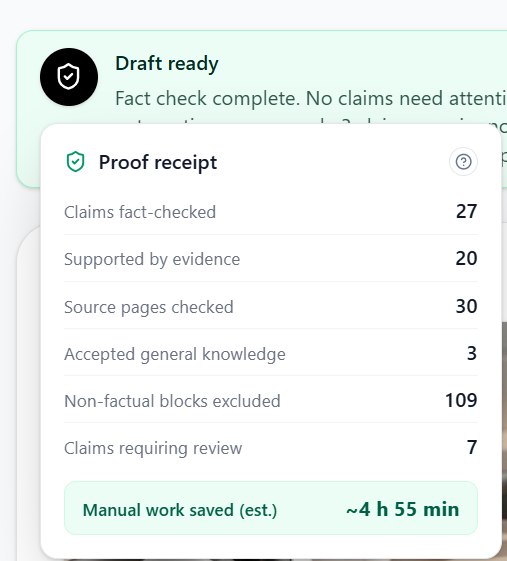
The Proof Receipt summarizes the work recorded for the article: sources consulted, evidence collected, claims checked, source pages checked, and quality issues repaired where that information is available. It can also show accepted general knowledge and claims that still require review.
It also estimates the manual work saved. What I like about this feature is that it makes the process inspectable: you can ask what supports a draft instead of judging its reliability by how confident the sentences sound.
Your personal experience is an input, not something the AI should invent
In the project settings, ProofWrite includes a Personal experiences field. This is where you add observations that came from actually using a product, carrying out a process, or working through a problem.
For me, this is one of the most important parts of the product.
The web does not need an eleventh version of the same ten articles. It needs the detail those articles missed: the setup step that took longer than expected, the restriction that only mattered once you had a client account, the workaround that made the tool useful, or the reason you chose a supposedly weaker option.
A useful experience note might explain what you tried, under what conditions, what happened, and what you would do differently. It should contain your actual observations. There is no value in asking a model to invent a month of product testing.
ProofWrite's writing instructions treat these notes as source material and tell the writer not to invent extra dates, measurements, settings, or outcomes. The experience should appear where it helps the reader understand the topic.
This connects directly with E-E-A-T: experience, expertise, authoritativeness, and trustworthiness. Google asks publishers to consider whether content demonstrates firsthand knowledge and contributes original value. It also states that E-E-A-T is not itself a single ranking factor. Google's helpful-content guidance is a useful reference for that distinction.
Can that help content survive a Google core update?
My experience with generic AI content is that an article can rank for a few months and then lose its place in the search results when it contributes little beyond what is already ranking. The initial visibility makes the approach look successful. The later loss reveals how little made the page worth keeping.
That is an observation from publishing, not a rule that Google removes all AI articles after a fixed number of months.
ProofWrite addresses the underlying weakness by combining research with your own experience and editorial direction. The aim is content with something useful to contribute, which is a more credible foundation for lasting rankings than rearranging the existing top ten.
I would not promise that adding experience makes an article immune to core updates. Rankings also depend on the site, the competition, the query, and factors outside the writer. ProofWrite helps you produce stronger content; Google still decides where it belongs.
AI Citation Monitor: see the gap, then create the missing content
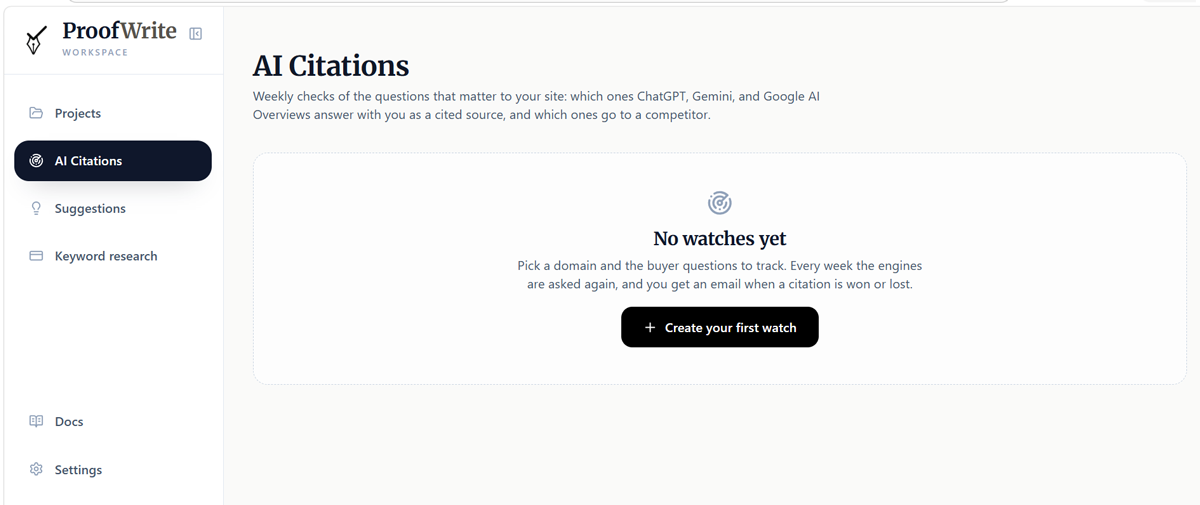
ProofWrite's AI Citation Monitor tracks whether your domain appears as a cited source for selected questions across ChatGPT, Gemini, and Google AI Overviews. It keeps a history so you can see citations being won or lost rather than repeatedly running isolated checks.
The setup begins with a domain and relevant topics. ProofWrite can suggest buyer questions, and you choose which ones to monitor or add your own. The useful unit is a question a prospective reader would actually ask, such as which software fits a particular business or how to solve a specific problem.
The first check runs immediately, followed by weekly scheduled checks. The workspace provides results by question and engine, run history, and notifications about changes. You can request another check, subject to the once-per-watch-per-day limit, and create or delete watches as your priorities change. If you start with the public AI Citation Checker, its completed result can become the first history point in your monitor.
There is a measurement detail worth understanding. ChatGPT and Gemini checks use search-enabled API responses. They do not reproduce every personalized conversation in the consumer apps. Google's part currently samples AI Overview citations in US-English search results; it is not a report of all your Google rankings or all AI Mode answers.
If Google does not produce an AI Overview for a question, that is different from producing one that cites competing sites but leaves yours out.
What happens when your article is missing?
Monitoring products can show you that a competitor is cited and you are not. That answers the measurement question. It does not necessarily get the content work done.
ProofWrite connects the finding to its writer. Citation gaps can become article opportunities with a suggested title, article type, and instructions. Where the opportunity concerns an existing page, the handoff can include that page's URL for a refresh.
You review the brief and open the project builder. From there, ProofWrite can research and write the new article or prepare an updated draft through the supported refresh workflow.
That is the difference I care about: the product helps with both detecting the problem and doing the writing needed to address it. You still approve the draft and publish the change. The monitor does not silently replace pages on your website, and an improved article is not guaranteed a citation on the next check.
For people who already have a writing process, the monitor is also available separately. You do not have to buy a writer subscription simply to track citation visibility.
All six article types, and when I would use each
The formats change the brief and the workflow. They are more useful than six different labels on the same text box.
1. Product, service, and company reviews
Review projects focus on one subject. You can provide the official website, explain the angle, add your experience, and supply an existing article URL when the task is a refresh.
The research and writing are suited to questions a reader asks before committing: what it does, what it costs, where it helps, where it falls short, and who should consider it. This is the format I would choose for a software review like this one.
2. Listicles and best-of roundups
Listicle projects handle multiple options, with separate choices for physical products and software or SaaS. They are intended for “best,” “top,” and alternatives-style articles where selection and ranking matter.
For affiliate publishers, domain settings can supply affiliate mappings and an Amazon Associate tag. Businesses can also allow relevant products of their own to participate in a roundup, with an option to prioritize a relevant own product. That is an editorial and commercial choice you should make consciously and disclose appropriately.
3. How-to guides
How-to projects are built around completing a task. The useful article explains the process, prerequisites, steps, and problems a reader may encounter.
This is where practical experience can make a large difference. Documentation can tell a reader where a setting is. Your notes can explain the mistake that makes the setting appear not to work.
4. Comparisons
Comparison projects evaluate two named entities or broader concepts. The setup supports automatic mode selection or an explicit choice, and named products can have official URLs supplied for each side.
I would use this for a reader who already has a shortlist and needs to understand tradeoffs. A good comparison should help someone choose based on their situation, rather than manufacture one universal winner.
5. Guest posts
Guest Post projects support a topic, an optional host site, and target links with anchor text and placement notes. You can generate topic suggestions around the link and publication context instead of forcing an unrelated link into an already-written article.
Research is enabled by default but can be switched off when appropriate. The workflow can reuse suitable earlier research for the same topic.
Standalone mode is useful here because the article may need to fit another publication rather than your own website's defaults. These tools help prepare the submission; they do not guarantee that an editor will accept it.
6. Freeform articles
Freeform is for custom structures, analysis, opinion, and material that does not fit the other formats. It supports optional web research and, on eligible paid plans, source-file uploads in PDF, DOCX, TXT, or Markdown format.
The current upload limit is three files with a combined size of 5 MB. With files attached, you can choose to use only that material. There is also an existing-article URL option for refresh work.
A standalone Freeform project can use the Humanize content option for a less templated editorial style. Site-backed projects use the site's voice settings instead. I would treat this as a style control, not a promise about AI detectors.
Brand voice, site settings, and the details you should only enter once
ProofWrite separates workspace defaults from settings for each managed domain. Standalone projects can use workspace defaults; articles for a specific website can inherit that site's configuration.
Shared project controls include target word count, writing language, tone, point of view, personal experiences, and custom AI instructions. The current language selector includes English, Spanish, French, German, Italian, Dutch, Portuguese, Danish, Norwegian, Finnish, Swedish, Romanian, and Polish.
At the domain level, you can save your company profile, target audience, value propositions, products and services, and social proof. You can also control brand mentions, competitor handling, and editorial rules. Site analysis helps populate the profile, but the detected information should still be reviewed.
Voice training accepts sample URLs or pasted writing and derives a reusable voice profile. Other controls include banned words and phrases, preferred terminology, an option to avoid common AI-sounding phrasing, and custom site instructions.
This is useful when the same editorial requirements apply to every article. Repeatedly telling a writer to avoid a phrase is busywork if the site can remember that preference.
Internal links, images, and relevant video
Internal linking can use your domain's sitemap, with indexing filters, a links-per-article target, and custom phrase-to-URL rules. You can re-index the site when its content changes.
Image settings cover generation, visual style, refinements, placement, aspect ratio preferences, brand colors, and previews. You can regenerate a featured image and edit image alternative text in the editor. Image allowances depend on the plan. Relevant YouTube embeds can also be enabled for supported review and comparison research when suitable videos are found.
Article defaults include source citation density and one-shot generation, which runs the research-to-draft workflow automatically. The benefit is consistency: the writer starts with the site's preferences instead of a blank configuration every time.
Daily Suggestions help fill the editorial queue
Daily Suggestions analyzes a managed domain to propose article ideas, tagged with a suitable format such as a review, listicle, how-to, or comparison. You can save an idea or turn it into a project, and filter suggestions by website and status.
Scheduling is controlled per domain, including timezone, morning hour, and whether weekends should be skipped. This is a paid feature, not part of the free Pilot.
I would still judge each idea against the audience. A suggestion is an editorial starting point, not an instruction to publish another page.
Editing, SEO and AEO guidance, and publishing
The Projects workspace lets you find articles by search, status, and type, and follow their progress from research through generation to completion. Available actions depend on the project's stage and saved work.
The editor autosaves and supports headings, text formatting, quotes, lists, links, images, tables, and YouTube embeds. You can edit the SEO title and meta description, revise the article yourself, or use the available rewrite actions.
Where the project offers Rewrite from saved research, you can regenerate the writing without repeating evidence collection. That is useful when the facts remain current and the problem is the angle or wording. A full pipeline rerun makes more sense when the underlying research needs to change.
Completed articles can show SEO, AEO, and citation-readiness guidance, including score breakdowns, suggested fixes, and keyword checks. SEO concerns search optimization; AEO concerns how clearly the page can answer questions. Citation readiness helps you inspect qualities that may make the content easier to use as a source.
Use these internal scores to prioritize edits, alongside your own reading of the article.
Google says the fundamentals of useful, accessible content also apply to its AI features, with no special AI markup required for inclusion. That is a helpful corrective to the idea that AEO is a hidden technical trick. Google's guidance on AI features explains the requirements and their limits.
Export or send the article to WordPress
You can copy the article, copy it as Markdown, or export Markdown and HTML. For other publishing platforms, these are the practical handoff options.
Direct WordPress publishing is available on Pro and Business. It works through a managed domain's connection, using a WordPress application password. The connection can default to saving a draft or publishing immediately.
I would start with drafts and inspect the first few posts in the destination theme. A connected publishing route does not eliminate the need to check the page readers will actually see.
The free SEO tools are useful on their own
ProofWrite also has public tools for people who are not ready to create an article project. Some provide an immediate preview and ask for an email or free account to unlock the complete result.
I covered several of these in my earlier article about the SEO questions Google leaves publishers to answer. Here is where they fit into the broader product.
Tool What you can use it for | |
|---|---|
Evaluate a public URL against a keyword, with SEO, AEO, and citation-readiness guidance | |
Run a point-in-time citation check and identify content opportunities before setting up ongoing monitoring | |
Compare what readable top-ranking pages repeat and what your own page contributes | |
Use Search Console exports to find potential new articles and existing pages worth improving | |
Evaluate a draft and its links, inspect findings, and create a shareable score badge for a pitch | |
View estimated update probabilities, historical context, backtesting, and update alerts | |
Compare your Search Console performance around confirmed updates |
The Information Gain Analyzer is particularly relevant to how I think about writing. It reports repeated points across the search results, unique contributions, and consensus points your page may be missing. You need to answer the basic question well while adding something beyond the common answer.
Content Gap Finder accepts a Search Console export ZIP or the matching query and page CSV files. It helps distinguish a topic that needs a new article from one where you should improve an existing URL. The opportunity can carry context into the project builder.
The Core Update Impact Checker's uploaded traffic analysis runs in the browser. It can show recovery estimates and an optional anonymous benchmark, but a change near an update is still correlation, not proof of a single cause. The Predictor offers probabilities, historical receipts, email alerts, and an embeddable live card; it does not know Google's private release schedule.
There is also a public guest posting sites directory, designed to show publication guidelines, required checker scores, and disclosed fees where listed. The directory and score badge help with preparation and transparency before you approach a publication.
ProofWrite pricing: what each plan includes
The current writer plans are Starter, Pro, and Business. These are the prices and allowances checked on September 16, 2026; consult the ProofWrite pricing page for the offer available when you subscribe.
Allowance | Starter | Pro | Business |
|---|---|---|---|
Monthly billing | $49/month | $139/month | $349/month |
Annual billing | $490/year | $1,390/year | $3,490/year |
Articles per month | 10 | 30 | 80 |
Keyword research runs per month | 50 | 150 | 400 |
Managed domains | 1 | 3 | 10 |
Team seats | 1 | 3 | unlimited |
Smart rewrites per article | 1 | 2 | 3 |
Generated images per article | 1 | up to 2 | up to 4 |
Monitored AI questions | 10 | 25 | 60 |
Direct WordPress publishing | No | Yes | Yes |
Listed prices exclude applicable taxes. Annual subscriptions retain monthly usage allowances. Paid plans do not impose a plan-level maximum word count, although you still set an article's target length.
The free Pilot starts with your first article generation, requires no credit card, and currently includes one article and ten keyword research runs. It is limited introductory access, not a renewable monthly free writing allowance.
Ongoing AI Citation Monitoring requires a paid writer plan or the standalone monitor subscription. The standalone option costs $29 per month for 25 monitored questions. If you also have a writer subscription, the larger monitoring allowance applies; the two allowances do not add together. The monitor subscription alone does not include a writer plan's article allowance.
The account area provides plan and usage information, billing controls, profile settings, and team management. Workspace owners can invite and remove members, and pending invitations count toward the seat allowance. Pro suits a small shared operation; Business adds more domains, articles, and unlimited team seats.
Where ProofWrite is a good fit, and where it takes more work
I think ProofWrite makes the most sense for publishers who need useful articles with evidence behind them and want a way to connect content production with search and AI visibility.
Affiliate publishers get review, comparison, and roundup workflows. Businesses can carry their brand knowledge and experience into articles. Agencies can manage several domains and shared access. Guest-post writers can prepare articles around a host publication and required links. Existing publishers can work on refreshes rather than continually adding new URLs.
There are tradeoffs.
Research, writing, validation, and fact checking take more work than instant text completion. Strong source material is not available for every subject. Personal experience still has to come from you. Some findings require human judgment, and direct WordPress publishing is reserved for the higher plans.
I would also avoid buying it solely because you expect an automatic traffic increase. The product improves the work you can do on the article. It cannot control your site's authority, an engine's source selection, or a competitor publishing something better tomorrow.
For a quick caption or a low-stakes brainstorming session, a generic chat tool may be sufficient. For an article carrying your name and asking readers to trust your recommendation, the additional process is the part I would want.
ProofWrite review FAQ
Does ProofWrite automatically fact-check articles?
Yes. Fact checking starts automatically after article generation, evaluates factual statements, and identifies unresolved findings. Generation workflows also attempt quality repairs. These do not guarantee an error-free article: review flagged claims, inspect important sources, and check the current version before publishing.
Can ProofWrite track citations in ChatGPT, Gemini, and Google?
Yes. AI Citation Monitoring checks selected questions through search-enabled ChatGPT and Gemini API responses and Google AI Overview results. It records citations over time. This is a defined sample of AI visibility, not complete coverage of every conversation or Google search experience.
Can ProofWrite improve an article that AI engines are not citing?
It can turn a citation gap into a brief for a new article or an existing-page refresh. You can then use the writer, research, and review tools to prepare the content. You still need to publish the result, and citation inclusion is not guaranteed.
How is ProofWrite different from using ChatGPT to write a blog post?
ProofWrite provides a structured publishing workflow around AI generation: format-specific research, keyword tools, saved brand and voice settings, quality checks, claim review, editing, publishing, and citation monitoring. You can assemble parts of that process manually around a chat tool; ProofWrite brings them together.
Will ProofWrite content survive Google core updates?
No writing tool can promise that. ProofWrite helps address weak, repetitive content through research, source support, and your firsthand experience. Those are useful foundations for durable content, but a core update can still change rankings.
Does ProofWrite work with existing articles and WordPress?
Yes. Review and Freeform projects support an existing article URL for refresh work, and content opportunities can prefill a refresh brief. Direct WordPress publishing requires Pro or Business and a connected managed domain. Markdown and HTML exports provide other publishing options.
My verdict
ProofWrite is worth considering if your problem is everything surrounding the draft: finding a worthwhile topic, collecting reliable information, adding your own insight, catching mistakes, and seeing whether the resulting page is cited.
The combination I care about most is research, personal experience, and claim review. Research gives the article a factual base. Your experience gives it something that competitors cannot obtain by rewriting the same sources. Claim review helps catch the details that would otherwise undermine the whole piece.
AI Citation Monitoring then adds a useful feedback loop. You can see where your site is missing and use the same product to work on the content gap.
My recommendation is to start with ProofWrite's free Pilot on a subject you know well. Add real experience notes, inspect the research and unresolved claims, and judge the article by what you would be comfortable publishing under your own name. That is a more meaningful test than whether it can fill a page with fluent sentences.