Disclaimer: This site may include affiliate links at no cost to you.
Table of Contents
This site ran on WordPress and Thrive Architect. I moved it to Astro with Claude Code, and the commit history shows how long the technical part took: the first commit is from 7:56 in the morning, and all the articles were in the new site at 10:51 the same day.
That number is true, and it's also misleading. The planning started five days earlier, and it decided whether the migration would work. In this article I'll show both parts, with the numbers from my own site, the prompts I used, and the things that went wrong.
The migration in numbers
| What | Number |
|---|---|
| Published on WordPress | 302 URLs (234 posts and 68 pages) |
| Moved to Astro | 78 posts and 10 pages |
| Articles that passed the automatic comparison with the live page | 74 of 78 |
| Old image addresses that redirect to a new file | 561 |
| Addresses that answer 410 (gone) | 202 |
| Checks in the redirect test on the live site | 2,386, with 0 failures |
| Migration code written by Claude Code | about 1,700 lines, 542 of them only to read Thrive's HTML |
My own time in the move was about a day. I use Claude's Max plan, which costs me €90 a month. This was my first move, and the scripts and checks exist now, so I expect the next one to be faster. I haven't tested that yet.
Why I left WordPress
I had started to edit my articles with Claude Code through the WordPress REST API. It worked, but every edit was a detour.
Thrive Architect doesn't show visitors the normal WordPress content. The page that people see is in a separate field called tve_updated_post, and post_content holds a stripped copy that search, RSS and the SEO plugin use. So each change had to be made twice, without breaking the wrappers, classes and data-css attributes that hold a Thrive page together. I used a 634-line Python script to make edits safely.
A Markdown file in Git has none of that. Claude Code edits the file, I read the diff, and the site builds.
I didn't move to get better rankings. Organic clicks had fallen 42% from one 180-day period to the next, and a new platform doesn't fix that by itself.
My trouble with Google started with the September 2023 helpful content update, and the site has never really recovered from it. I'm far from the only one. Glenn Gabe checked several hundred sites that the same update had hit. Half a year later, he hadn't seen a single one recover.
The November 2026 core update was the latest example. In October I had updated ten of the articles I was keeping, and seven of those were rewritten completely. Less than two weeks into the update, while it was still rolling out, their mobile impressions had dropped from 302 to 97 a day. The articles I hadn't touched went up a little, from 308 to 333. I can't point to anything that explains the difference. The full table is in how I use Claude for SEO.
In my experience, Google's updates can take down legitimate sites without telling you why. I can't control that. What I can control is how quickly I can improve the site, measure the result and try again, and that's what the move gave me.
What I stop paying for. In November 2026, Thrive Suite costs a new customer $240 a year, and the list price is $599. My Hostinger plan would have renewed at €215.76 a year, and it ran my other sites too. I've turned off the renewal. My Thrive subscription runs until April 2028, so that saving comes later.
I don't set the Claude subscription against these numbers. I have it anyway and use it for everything, so it isn't a cost of the move. If you'd buy it only for this, count it in.
Should you do the same?
Astro builds static pages, so the answer depends on what your site does.
It fits well if your site is mostly articles and pages, you are comfortable with files and Git or willing to let Claude Code handle them, and you don't need other people to edit in a visual editor.
Stay on WordPress if you run WooCommerce or a membership area, several non-technical people publish content, or your site depends on plugins that keep data in the database.
If your posts are in the normal block editor, the move is easier than mine. Astro's own WordPress migration guide points to a tool that exports posts to Markdown. With a page builder such as Thrive, an exporter only sees the stripped copy, so you need your own converter.
Step 1: Decide what not to move
This is the step that took days, and it's the one I'd never skip.
Claude Code read 16 months of Google Search Console data through the API and made a spreadsheet with one row per URL: clicks, impressions, backlinks, a suggested decision and a reason. I went through it and wrote my own decision next to each suggestion. My column always won.
The result was blunt. Of 234 posts I kept 78, and of 68 pages 11. What I kept brought about 72% of the clicks. The rest was either without traffic or outside the topics this site is about now, so those addresses redirect to a close match or are marked as gone.
Two things saved me from mistakes here:
- Backlinks. The strongest external link to my domain pointed to an address that was already a redirect. Without the Ahrefs export and the rules of the Redirection plugin, I could have lost it.
- Old addresses that aren't in WordPress anymore. Google still knew 40 URLs that no longer exist in WordPress. They aren't in an export, but they need an answer too.
Step 2: Write the rules before the code
Claude Code reads a file called CLAUDE.md at the start of every session. I put the limits there before any code was written. These rules did the most work:
- This project only reads WordPress. Never run a command that saves to it.
- Never push. A push publishes the site, and I do that myself.
- Never change DNS or Cloudflare settings.
- The address of a page that stays does not change.
- Move the content word for word. Prices and ratings stay as they are.
- Never invent experiences, tests or ratings. Mark the gaps with TODO.
- A page that still has a TODO must not be published.
- Commit in small steps, and run the checks before each commit.
The last-but-one rule became code. If a published page still contains a TODO for me, the build fails.
My first prompt was short, because the rules and the plan were already in files. Translated from Finnish:
Read CLAUDE.md and ASTRO-PLAN.md. Start with steps 1 and 2 of the work order: the Astro base and the conversion script with four test articles.
Step 3: Test the conversion with the four hardest articles
I didn't start with the whole site. I picked one review, one comparison, one guide and one article in Finnish. Between them they used most of the Thrive elements I needed to handle: review boxes, pros and cons, tables, rating stars, buttons, styled lists and columns.
Claude Code wrote a converter that turns Thrive's HTML into MDX. A Thrive review box becomes a <ReviewBox /> component, and an affiliate button becomes a link with the right rel values. If the script met an element it didn't recognize, it printed a warning instead of guessing.
I set one more rule: fix the script, not the article. A manual fix helps one page. A fix in the script helps all of them, and the next run doesn't undo it.
Step 4: Compare every page with the live site
This is the part I'd copy to any migration. A second script builds the new site, takes the live page and compares them:
- every word, in order
- headings
- links and their
relvalues - images and alt texts
- title, meta description and dates
Changes I had asked for, such as a removed link to a dropped page, are listed as notes. Anything else is an error. When I wrote "start the migration", the script had already matched all four test articles.
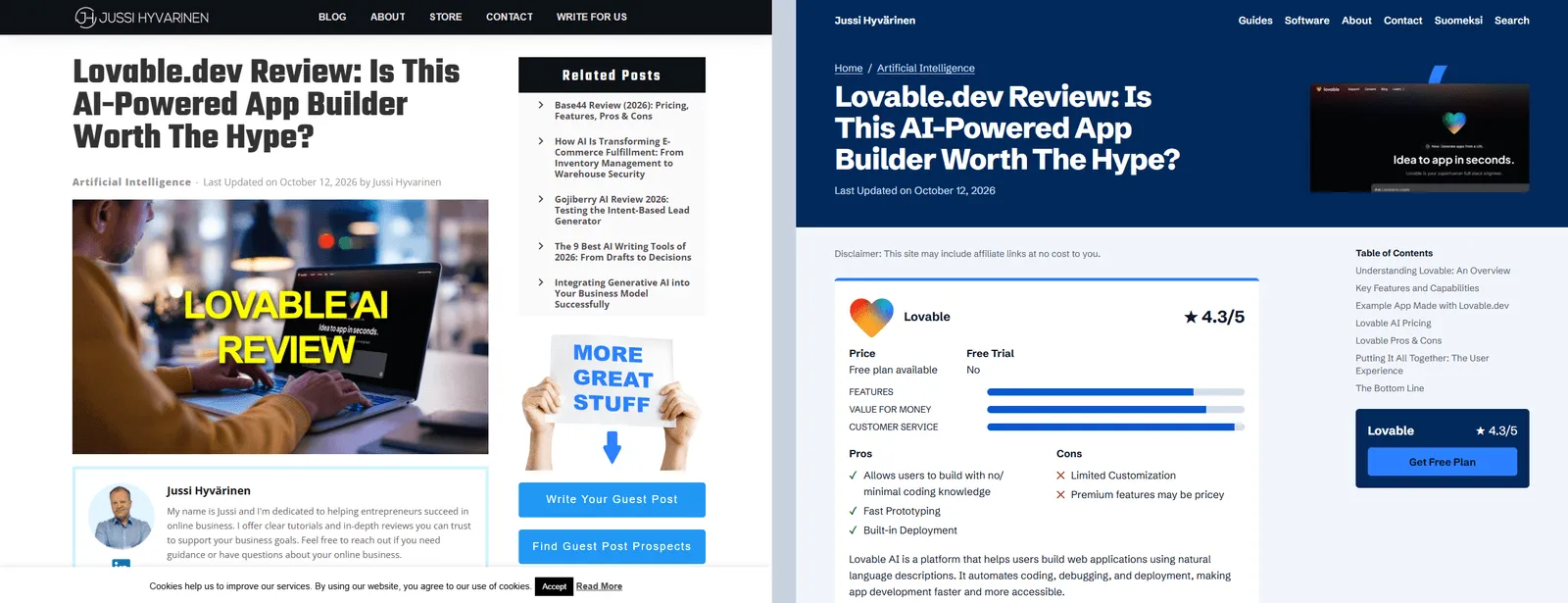
In the full run, 74 of the 78 articles matched. The other four differed only because I had removed boxes for free tools that I was dropping.
What went wrong
Some of these came up in the comparison, and some only because somebody looked closely.
The normal content field was the wrong one. Anything that reads post_content gets Thrive's stripped copy. And on Thrive landing pages the Thrive field was empty too, so those pages had to be converted from the public HTML.
Missing spaces. An early version of the converter lost some of the spaces between words. That's easy to miss by eye and obvious in a word-by-word comparison.
Alt texts that don't exist. Rank Math fills an empty alt text from the file name when the page is rendered. Nothing is saved in the content, so a converter that reads the database loses them. I moved the generated ones so that nothing changed, and got a list of 153 images that need a real alt text.
Years that change by themselves. Three articles used a Thrive shortcode for the current year. In Markdown it becomes fixed text, so they are on a list for January.
Curly quotes. Astro's Markdown can turn straight quotes into curly ones. It looks nicer, but it changes the text, so I turned it off.
The language was wrong on every Finnish page. WordPress had marked the whole site as en-US, including the articles in Finnish. Now each article has a lang field.
Tracking I didn't know about. I answered that my affiliate short links had no tracking pixels. Claude Code checked all of them for the privacy policy, and seven had tracking codes.
A redirect that nobody had made. WordPress guesses where a broken address should go. It sent /contact/ to my contact page, although no plugin or file had a rule for it. The preview answered 404, so I added one.
A cookie that came with the host. My privacy policy says that the site sets no cookies. After the switch, a test in a clean browser found one: cf_clearance, valid for a year. Cloudflare's JavaScript Detections was still on although Bot Fight Mode was off, and I couldn't find a switch for it in the dashboard of the free plan. It was turned off through the API. The preview didn't have the cookie, so check the live site too.
A scrollbar that only I saw. On my own screen, the home page had a second scrollbar inside the sidebar. It hadn't come up in Claude Code's own checks. Open the site on your own devices before you trust any test.
Redirects: where migrations lose traffic
I host the site on Cloudflare Workers with static assets. Requests to static assets are free and unlimited, and a small Worker handles what files can't. Every old address gets one of four answers:
- Same address, 200. All pages that stay.
- 301 to a close match. One step only. Chains in the old plugin's rules were resolved first.
- 410. Pages that are gone and have no match. I don't send everything to the home page.
- 301 for images. Google Images traffic goes to the new files, including WordPress's resized copies such as
photo-300x200.jpg.
Three details are easy to miss on Cloudflare:
- The
_redirectsfile is limited to 2,000 static and 100 dynamic rules, and the default status is 302. Write 301 on every line. - The built-in trailing slash redirect answers 307. I wanted 301, so each rule exists both with and without the slash.
- Rules in
_redirectsrun before files. A wildcard such as/category/*also catches the categories you want to keep. I put the patterns in the Worker, which only runs when no file matches.
Then a script requested every old address and checked the status and the target: first on my computer, then on the preview, and after the switch on the live site. The last run made 2,386 checks with 0 failures. It also listed three addresses that Google knows and my plan didn't.
What replaced the plugins
| Job | On WordPress | On Astro |
|---|---|---|
| Page building | Thrive Architect | MDX with my own components |
| SEO titles and schema | Rank Math | Frontmatter and a schema file |
| Redirects | Redirection plugin | _redirects and a Worker |
| Contact form | Thrive and WP Mail SMTP | A Worker with Turnstile and Resend |
| Search | WordPress search | Pagefind, built with the site |
What I didn't let Claude Code do
I made every decision that can't be undone easily. Claude Code suggested what to keep, but I decided on each URL. It made three designs, and I chose one. It drafted the privacy policy and checked the facts, and I approved it.
I also kept the keys. Pushing, the DNS switch and the API keys stayed with me, and no key was pasted into the chat. After the switch I let Claude Code into my Cloudflare account. It asked before it turned off the cookie setting and before it deleted three old WordPress rules, and it changed nothing else there.
Results
I measured four pages with Lighthouse on WordPress the day before the switch, because you can't do it afterwards. I measured the same pages the same way on the new site: the median of three mobile runs from my own computer.
| Page | Performance | Largest Contentful Paint | Page weight | Requests |
|---|---|---|---|---|
| Home page | 58 → 99 | 4.8 → 2.1 s | 1.9 → 0.4 MB | 122 → 24 |
| Review (Lovable) | 57 → 100 | 6.4 → 1.4 s | 2.1 → 0.1 MB | 121 → 10 |
| Guide (Claude) | 60 → 100 | 5.6 → 1.3 s | 2.0 → 0.2 MB | 118 → 9 |
| Comparison (AI story generators) | 54 → 100 | 7.0 → 1.3 s | 2.5 → 0.2 MB | 121 → 10 |
Accessibility went from 86–89 to 100, best practices from 81 to 100 and SEO from 85 to 100. An automatic test finds only some accessibility problems, so a 100 isn't proof that everything works.
Part of the difference comes from what I left out. Google Tag Manager, the Meta pixel, the popup tool and the cookie banner aren't on the new site.
Faster pages aren't the same thing as more visitors. The Search Console figures aren't here yet, because eight weeks after the switch is the earliest I'd draw a conclusion from them. If clicks go down, I'll write that here too.
My checklist
- Export Search Console data and backlinks. Decide on every URL.
- Write the rules into
CLAUDE.md. - Find out where your page builder really keeps the content.
- Convert three to five of the hardest pages.
- Build the comparison before you convert the rest.
- Move the content as it is. Rewrite later, so that you can tell the effects apart.
- Test every old address, images and feeds included.
- Measure the old site.
- Take a full backup and write down the old DNS record. That's your way back.
- Switch, run every test again on the live site, check for cookies and send the new sitemap to Search Console.
- Watch the 404s every week.
Frequently asked questions
Do I need to know how to code?
You don't need to write the code, but you need to understand what is being changed. I read the plan, the differences and the test results. If you can't tell a 301 from a 410, learn that before you start.
Will moving from WordPress to Astro hurt my rankings?
It can, if addresses change or redirects are missing. Keep the addresses, titles and content the same, and change the platform only. Some movement after a switch is normal.
Can I go back to WordPress?
Yes, as long as you keep the old hosting. Mine is paid until April 2027, so going back means changing one DNS record. I also have a full copy of the WordPress site on my own computer.
Can I still get comments and forms?
Forms need a service or a small function behind them. Mine is a Cloudflare Worker that sends the message by email. My articles didn't show comments, so there was nothing to move. If you need them, choose a comment service first.